Market Research & Product UX Analysis - February 2026
Research Overview
A deep-dive UX analysis of the four leading products in the random video chat category; "Chatroulette", "OmeTV", "Azar", and "Monkey". Those productscollectively serving hundreds of millions of users worldwide. We examine how each product handles navigation architecture, session mechanics, filtering, safety, and conversation flow to understand what separates the best-in-class experiences from the rest.
Products Under Analysis
Chatroulette
The category pioneer — instant anonymous video matching with no registration required.
📦 New on app market🌐 Mostly used on web⭐ Category pioneer
Azar
Profile-first approach with advanced filters, a reputation system, and AR face filters
📦 100M+ installs⭐ 4.7 · App Store⭐ 3.8 · Google Play
OmeTV
100M+ user platform with country and gender filtering across text and video modes.
📦 100M+ installs⭐ 4.5 · App Store⭐ 3.7 · Google Play
Monkey
Gen Z-targeted minimal UX with 15-second staged matching and Snapchat integration.
📦 17M+ installs⭐ 4.1 · App Store⭐ 3.9 · Google Play
How each product structures entry, session, and controls. Use the quick-reference cards and tree maps below to compare models.
C
Chatroulette
Optional Pre-Filter
Landing
↓
Quick Start or Filters
↓
Match Queue
↓
Session
↓
Skip · Mute · Text · Report
EntryLanding → 2 paths
DepthMedium
FiltersCountry · Gender · Language · Topic
Best forOptional control, low friction
Trade-offBalances speed with user agency
A
Azar
Multi-Mode Hub
Home Hub
↓
Video · Live · Lounge · Profile
↓
Filter Panel Gender · Region · Hashtags
↓
Session
↓
Skip · Effects · Translation · Gifts
EntryHub → 4 modes
DepthHigh (multi-mode)
FiltersGender · Region · Interests · Hashtags
Best forDiscovery, profile, in-call features
Trade-offRich features, more friction
O
OmeTV
Minimal Linear
Start Button
↓
Session
↓
Skip · Safety · Settings
EntrySingle CTA
DepthLow (linear)
FiltersCountry · I AM (at entry only)
Best forFastest time to first match
Trade-offFastest activation, least control
M
Monkey
Minimal Single-Loop
One-Tap Start
↓
Session
↓
Skip · Safety
EntryOne tap
DepthMinimal (single loop)
FiltersBoth / Preferences only
Best forGen Z; speed over options
Trade-offFastest, least feature depth
UX Analyses
Screenshots organised by UX moment across Chatroulette, OmeTV, Azar, and Monkey — showing how each product handles each step of the user journey.
01
Intro Screen
The first screen a user sees when opening the app — sets tone, brand, and the primary CTA.
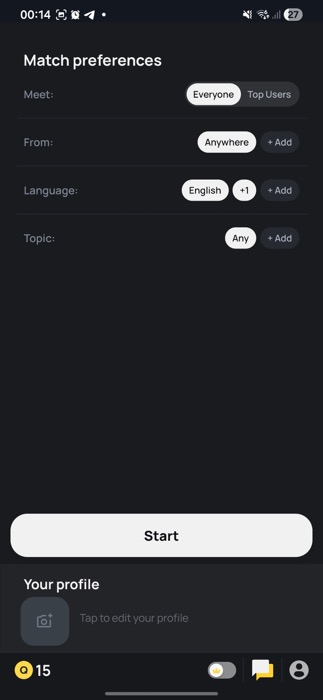
Chatroulette
Match preferences screen with Start CTA, profile section, and filter toggles below
Insight
Leads with preferences, giving users a sense of control before entering the match flow.
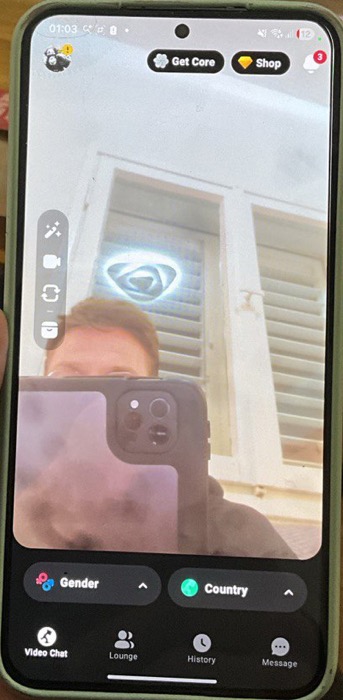
Azar
Home screen — camera active, Gender + Country filter pills, Video Chat / Lounge / History / Message bottom nav
Insight
Activates the camera immediately on the intro screen, creating instant engagement.
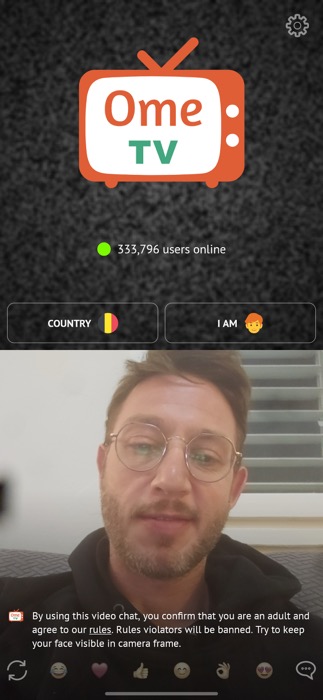
OmeTV
Logo + live user count + COUNTRY / I AM filters + camera feed already active below
Insight
Activates the camera immediately on the intro screen, creating instant engagement.
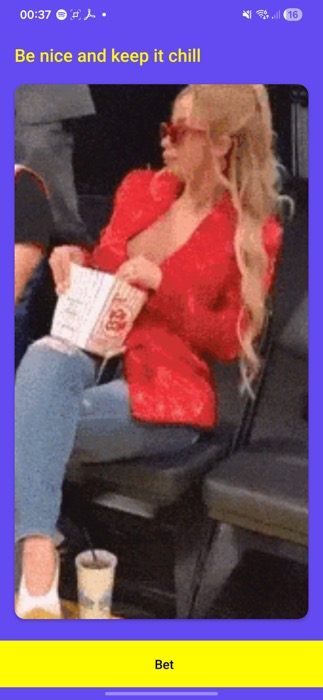
Monkey
"Be nice and keep it chill" pre-entry screen — tone-setter with a single "Bet" confirmation CTA
Insight
Uses a micro-commitment ("Bet") to prime respectful behaviour before entering.
Conclusion
The gap between these approaches is significant — OmeTV and Azar drop users directly into a live camera feed, creating immediate presence and the highest emotional activation before a single tap. Chatroulette sits at the opposite end: preferences-first means full control but a noticeably colder, lower-energy entry. Monkey's "Bet" micro-commitment lands in between — low friction, but with behavioural priming that measurably sets tone.
The strongest intro combines both signals: activate the camera immediately to create presence, then surface a single lightweight commitment moment before the first match begins — delivering activation intensity without sacrificing behavioural quality.
If speed-to-first-match is the priority → activate the camera on the home screen with no gate, like OmeTV. Remove all friction between open and match.
If quality of interaction matters more than volume → add a single micro-commitment screen before the first match (Monkey's "Bet" model). One confirmation, not a form.
If user control and trust are your differentiator → lead with preferences like Chatroulette, but keep the Start CTA dominant and all filters opt-in so the path stays fast for users who skip them.
02
Filters
How each product lets users control who they are matched with — country, gender, language, interests.
Chatroulette
Before session -Meet: Everyone / Top Users · From: Anywhere · Language: English · Topic: Any — all opt-in, not blocking the Start CTA
Insight
Filters are opt-in and never block the default path, balancing control with speed to match.
Azar
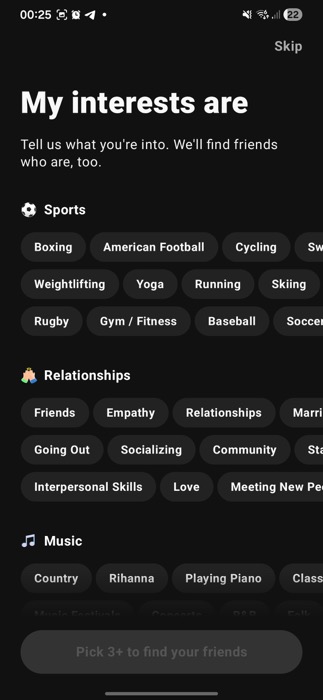
Before session - "My interests are" — interest-based matching: Sports, Relationships, Music categories; pick 3+ to unlock matching
Insight
Rich filter set (gender, country, interests) surfaced progressively, allowing for tailored matches.
Azar
In session - Gender and Country filter pills at bottom — richest filter set in the category; visible as expandable chips on the home screen
Insight
In-session filters are visible as expandable chips, offering rich controls without interrupting the flow.
OmeTV
In session - Two-tap filter bar: COUNTRY and I AM — minimal, placed above the fold, doesn't interrupt the session loop
Insight
Keeps filters minimal (two taps) and placed above the fold, ensuring they don't interrupt the session loop.
Monkey
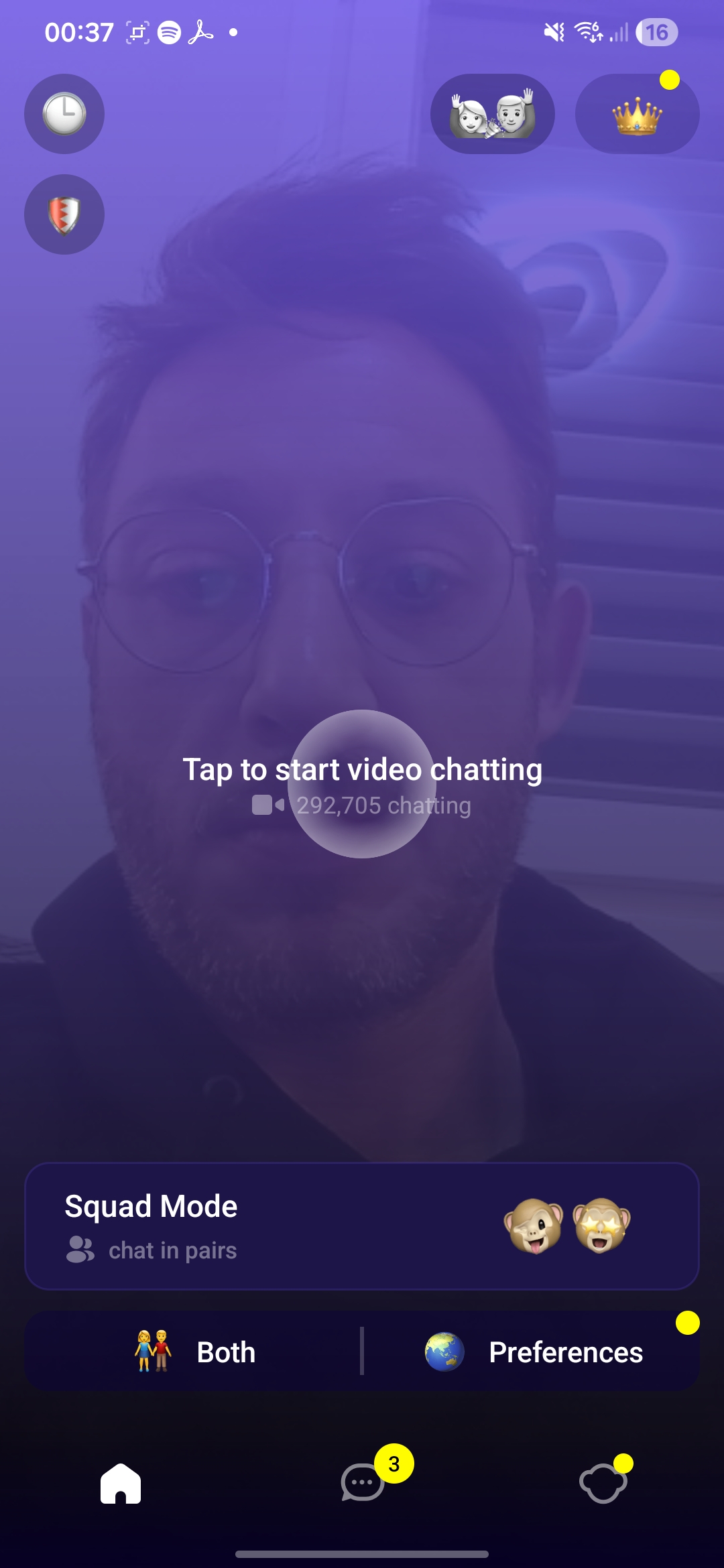
Home screen — "Tap to start video chatting" dominates; Both / Preferences filter toggle at bottom; Squad Mode as secondary option; 292,705 users live
Insight
The "Both / Preferences" toggle is minimal, reinforcing speed over detailed control in the match flow.
Conclusion
The difference in filter philosophy is stark — Monkey offers a single toggle, OmeTV two taps, while Azar builds a layered system of gender, country, and interest matching. The gap in match quality versus match speed is real and measurable: richer filters mean longer wait times but higher relevance.
The winning pattern is opt-in and non-blocking: filters should never stand between the user and their first match, but must be immediately accessible for those who want them.
If time-to-first-match is critical → adopt OmeTV's model: two persistent filter taps above the fold, never in the path of the Start CTA.
If match relevance and retention matter more → use Azar's progressive disclosure: surface interest-based filters as an onboarding step, keep gender/country as expandable chips during the session.
If your audience skews younger and speed-first → Monkey's single "Both Preferences" toggle below the CTA is the floor — minimal, invisible until needed.
03
Safety Rules
How community guidelines and moderation rules are surfaced to users — once, always-on, or on-demand.
Azar
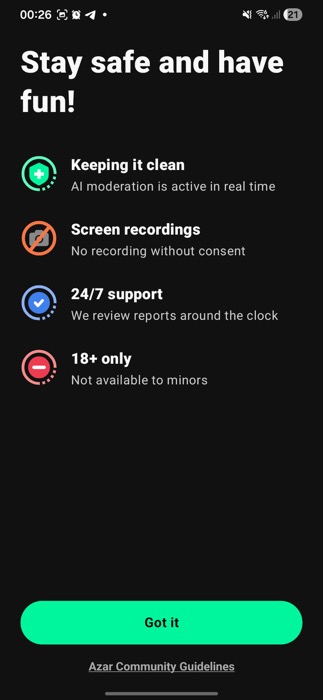
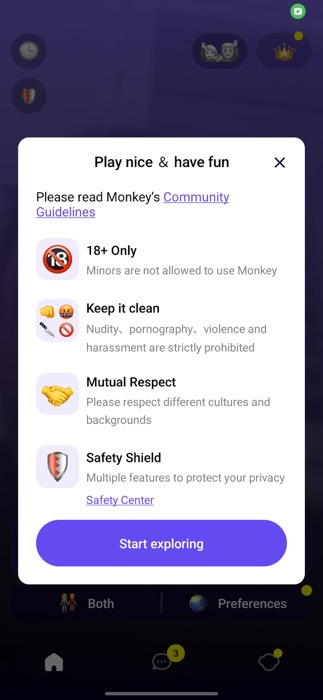
"Stay safe and have fun" — AI moderation, no screen recording, 24/7 support, 18+ only; one-time screen before entering
Insight
Uses a one-time full-screen safety screen before first session, highlighting AI moderation and 24/7 support.
OmeTV
Persistent on-screen disclaimer: "confirm you are an adult, agree to rules, keep face visible" — always visible in session, no blocking modal
Insight
Rules are a persistent footer, always visible in session without blocking interaction.
OmeTV
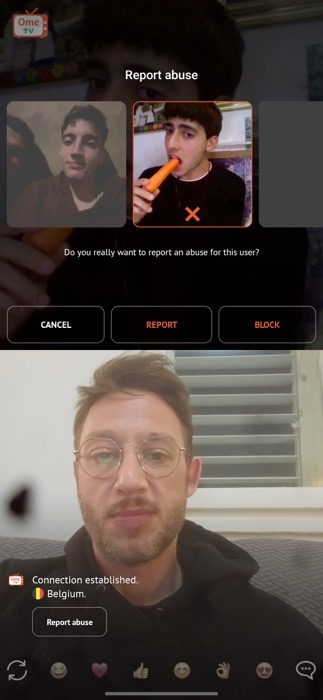
In-session report modal: Cancel / Report / Block — accessible from every session without leaving the flow
Insight
An in-session report modal is accessible from every session, allowing immediate action without leaving the flow.
Uses a one-time full-screen safety screen before first session, focusing on positive behavioral priming.
Monkey
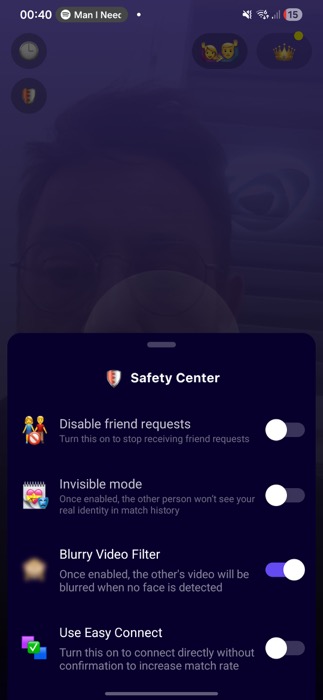
Safety Center — on-demand branch: Disable friend requests, Invisible mode, Blurry Video Filter, Easy Connect toggles
Insight
Provides a dedicated Safety Center for granular controls (e.g., blur filter), keeping the main loop clean.
Conclusion
The intensity of safety communication varies significantly — OmeTV keeps rules permanently on-screen (highest visibility, zero friction), while Azar and Monkey front-load rules as a one-time gate before the first session. No product gets this entirely right: always-on text competes with the video feed, while one-time gates are forgotten after day one. Notably, Azar's native AR face filters add a passive layer of safety — users can mask their face mid-conversation, enabling a level of privacy and discretion that no other product in the category offers without third-party tools.
The strongest safety model separates urgency from permanence: a one-time behavioural gate on first launch, a persistent but minimal report button always in view, and on-demand granular controls (like Monkey's Safety Center) for users who want more.
If your platform has a younger or more vulnerable audience → use a full-screen one-time safety gate (Azar/Monkey model) before the first match, not a dismissible tooltip.
If reducing harassment at scale is the priority → OmeTV's persistent on-screen disclaimer creates ambient accountability — combine it with an always-visible report button for maximum coverage.
If user privacy and discretion are a differentiator → integrate optional face-masking (AR filters or blur) as a built-in safety tool, not a cosmetic feature — it directly lowers the barrier to entry for camera-shy or privacy-conscious users.
04
Camera & Microphone Activation
How products handle the camera/mic permission moment and show users their own feed before going live.
Chatroulette
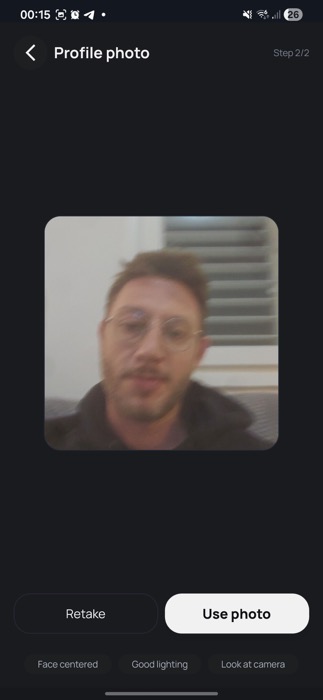
Profile photo step — camera previews the user's face with guidance ("Face centered, Good lighting, Look at camera") before going live
Insight
Uses an explicit profile photo step with framing guidance before going live, creating a controlled user appearance.
Azar
Live camera feed fills the home screen before any match — user is "already live" and comfortable with their image before connecting
Insight
Activates the camera on the home screen before any match, reducing camera-permission friction.
OmeTV
Camera activates immediately on the home screen — user sees their own live feed before tapping Start, reducing camera-permission friction
Insight
Activates the camera immediately on the home screen, allowing users to see their live feed before starting a match.
Monkey
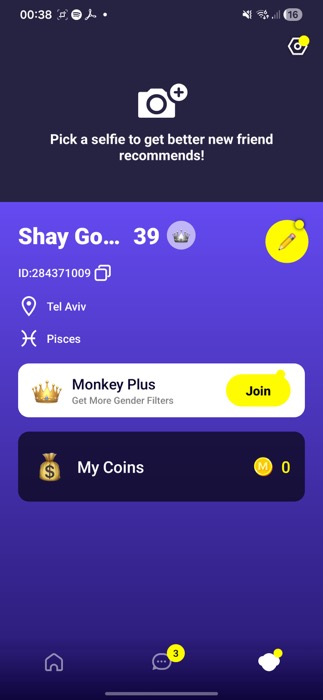
"Pick a selfie" camera prompt for profile photo — camera permission tied to profile setup, not to matching directly
Insight
Camera permission is tied to profile setup (e.g., "Pick a selfie"), separate from direct matching, simplifying the live session.
Conclusion
The camera activation moment is more consequential than it appears — seeing yourself unexpectedly mid-session is one of the highest drop-off triggers in video products. OmeTV and Azar eliminate this by activating the camera before any matching begins, normalising the user's own image passively. Chatroulette's guided photo step (face centred, good lighting) is the most intentional approach but adds friction. Notably, Azar is the only product that makes AR face filters available from this stage — users can apply effects before their first match, which meaningfully reduces camera anxiety and offers an immediate layer of visual privacy.
Camera-on before matching is the clear best practice. Pairing it with an optional AR filter or blur at activation removes the last barrier for camera-shy users.
If reducing camera drop-off is the goal → activate the camera on the home screen before the Start CTA, like OmeTV and Azar. Let users see themselves before they're seen by others.
If brand trust and first impression matter → add framing guidance at activation (Chatroulette model: face centred, good lighting) — it signals care without blocking the path.
If privacy is a product value → offer an optional AR mask or blur filter at camera activation, not just mid-session. It lowers the psychological barrier to going live for the first time.
05
Looking for Match
The queue / searching state — what users see and feel while the app finds them a connection.
Chatroulette
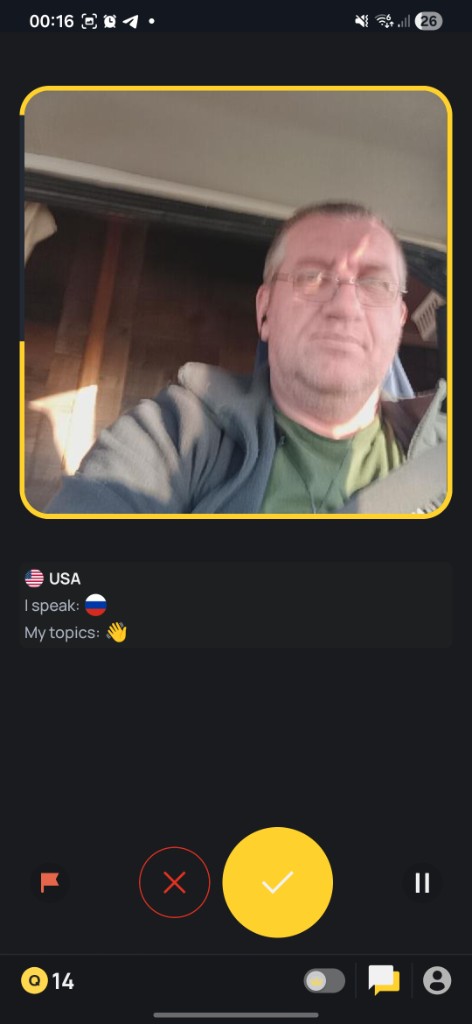
Pre-video card — partner's profile (USA · I speak · My topics) shown with ✓/✗ accept before cameras open; mutual acceptance gate reduces cold-open skips
Insight
Shows partner's full profile card (country, language, topics) with explicit ✓/✗ accept gate before cameras open, making the match feel mutual and reducing cold-open skips.
Azar
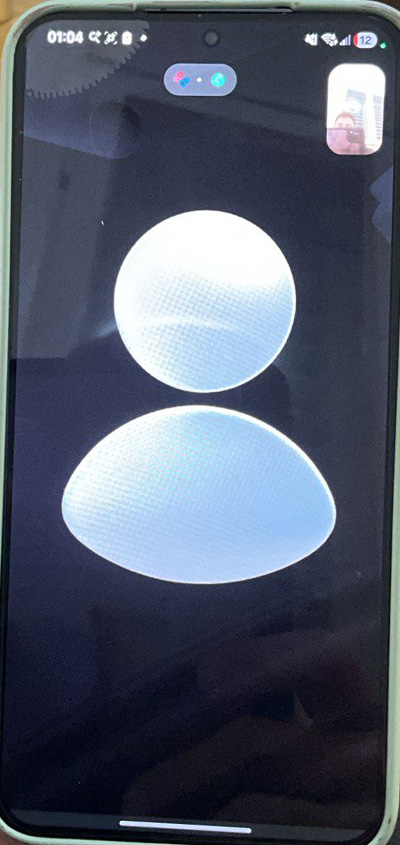
Searching state — full-screen dark canvas with a silhouette avatar; PiP self-view active top-right; action bar (chat, effects, flip, refresh, gifts) ready
Insight
Keeps the searching moment anonymous with a neutral avatar and self-view only, signalling progress through subtle motion and a ready action bar until the connection is live.
OmeTV
Split-screen during search — top half shows TV-static noise (partner slot empty); "Searching for a partner…" label at bottom left; user's own camera live in bottom half; full emoji bar already visible so the UI feels ready
Insight
Uses TV-static noise in the partner slot as a visual metaphor for searching, with the user's camera and emoji bar already live so the UI feels ready.
Monkey
Pre-queue home screen — "Tap to start video chatting" with live user count (292,705 chatting) sets social-proof expectation before tapping; no loading screen is shown after tap — match entry is instant
Insight
Skips a loading state entirely, setting social-proof expectations with a live user count before instant match entry.
Conclusion
The searching state is a high-anxiety, under-designed moment across the category — no product shows estimated wait time or queue position, creating uncertainty that drives early abandonment. The approaches range from Chatroulette's deliberate mutual-acceptance gate (highest friction, highest perceived quality) to Monkey's instant match with no loading state at all. The gap between these is significant: a 2–3 second wait with no feedback feels longer than a 10-second wait with a visible progress signal.
The best searching state turns wait time into anticipation — showing partial identity, a pulsing visual metaphor, or a live user count reframes the queue as engagement, not dead time.
If match quality matters most → use Chatroulette's profile-card gate before cameras open. Mutual acceptance dramatically reduces cold-open skips and sets a tone of intentionality.
If speed and energy are the product's core feel → skip the loading state entirely like Monkey — use a live user count on the home screen to set expectations before the tap.
If you want the best of both → follow Azar's model: use a calm, anonymous searching screen (avatar + self-view + controls) and move identity reveal to the connection moment, so wait time feels safe but still intentional.
06
Video Conversation
The live video session UI — how remote and self feeds are laid out, what controls are visible, and what information about the other person is shown.
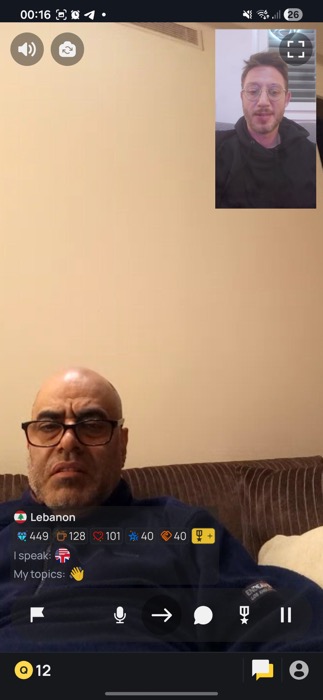
Features a full-remote feed with PiP self-view and comprehensive controls for flagging, reporting, and communication.
Azar
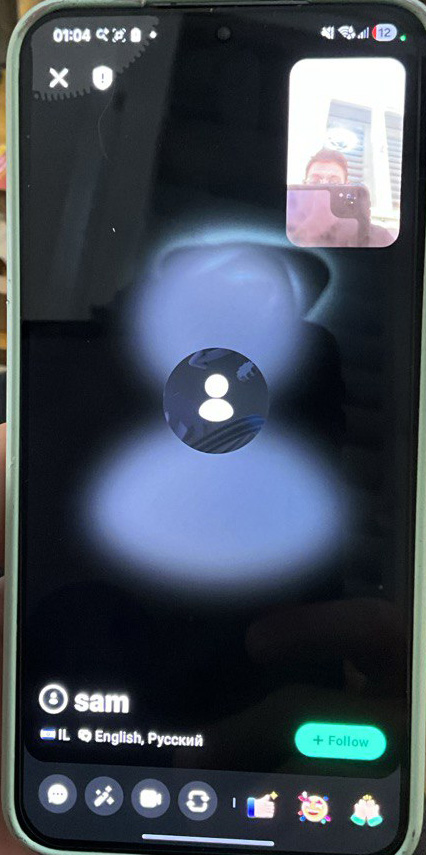
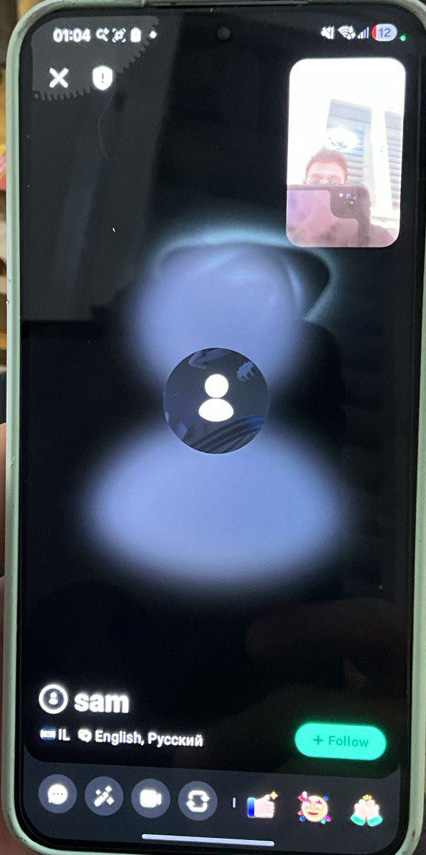
Match connecting — partner avatar (blurred silhouette) while camera loads; identity card: "sam · IL · English, Русский · +Follow". PiP self-view top-right; full action bar (chat, effects, flip, refresh, gifts) in thumb zone.
Insight
Reveals partner's identity and Follow CTA while the camera loads, with native AR face filters — face-altering effects and backgrounds accessible mid-call without leaving the session.
OmeTV
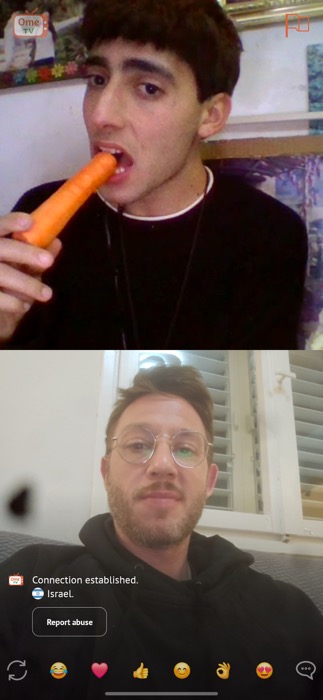
Split-screen top/bottom layout — "Connection established · Israel" banner and Report abuse link. Emoji reactions (laugh, heart, thumbs-up) along the bottom edge.
Insight
Employs a split-screen layout with an emoji reaction bar, facilitating instant interaction and breaking dead air.
Monkey
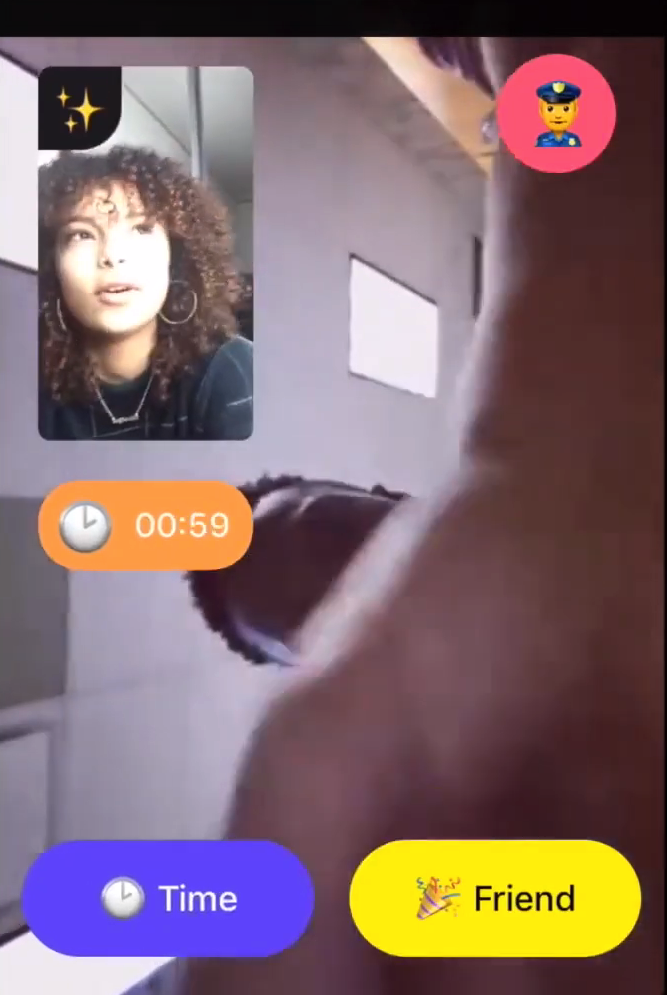
Live call — full-screen remote video + PiP self-view (top-left with sparkle effects filter). 00:59 countdown timer creates urgency; police 👮 report button top-right; "Time" (extend) and "Friend" (add) as the only two CTAs at bottom.
Insight
Unique in showing a visible countdown timer (00:59) during the call — "Time" to extend or "Friend" to save the connection — a staged-escalation model that is the most structured session design in the category.
Conclusion
Session UI design splits clearly between two philosophies: stranger-dominant full-screen (Chatroulette, Azar, Monkey) versus split-screen parity (OmeTV). The intensity of the difference is felt immediately — full-screen puts the other person at maximum emotional presence, while split-screen reduces awkwardness by keeping both feeds visible and equal. Azar stands alone in the category with native AR face filters built into the live call: users can mask, alter, or theme their appearance mid-conversation without leaving the session, adding both expressive depth and a meaningful privacy layer unavailable in any competing product.
Full-screen stranger-dominant is the stronger emotional design. Layer social context (identity, follow) during camera load like Azar, and surface interaction tools (emoji bar, AR filters) in the thumb zone — never behind a menu.
If maximising emotional connection is the goal → go full-screen stranger-dominant with PiP self-view. The other person should feel as present as possible.
If reducing awkwardness for new users is the priority → OmeTV's split-screen layout equalises both feeds, lowering the psychological pressure of a full-screen stranger.
If privacy and expressiveness are product values → build native AR filters into the session layer like Azar. Face-masking is not a cosmetic feature — it directly reduces drop-off among camera-shy users and adds a safety dimension no other product in the category currently offers.
07
Chat
Text-based communication — in-session chat, post-match messaging, and onboarding conversations.
Azar
In-session — partner identity (sam · IL · English, Русский · +Follow) visible while camera loads; emoji-only action bar at bottom (no text chat); effects, flip, refresh, and gift icons
Insight
No text chat, relying solely on emoji-only interaction (reactions, gifts, animated overlays), which keeps the experience visual and lightweight.
Azar
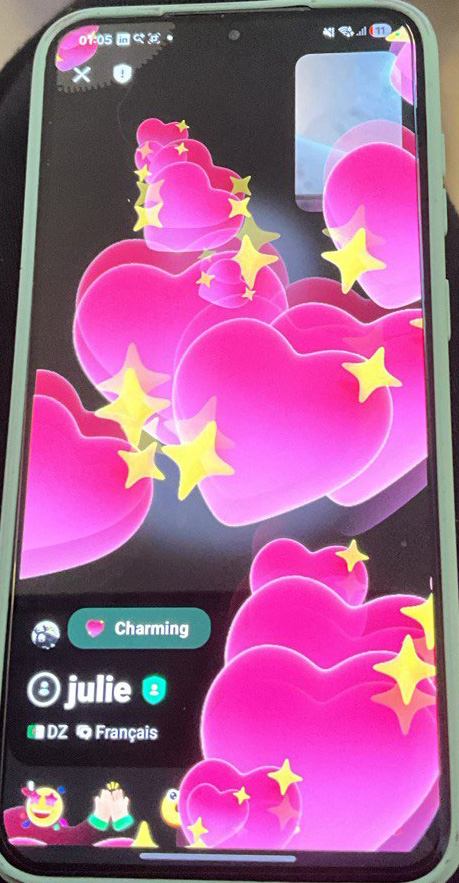
Match screen — full-screen animated hearts and stars overlay; "julie · DZ · Français · Charming" badge; emoji reactions (😍, 🙏) as the only interaction layer — no text chat in Azar
Insight
In-session interaction is emoji-only, removing a fallback for camera-shy users or noisy environments.
Monkey
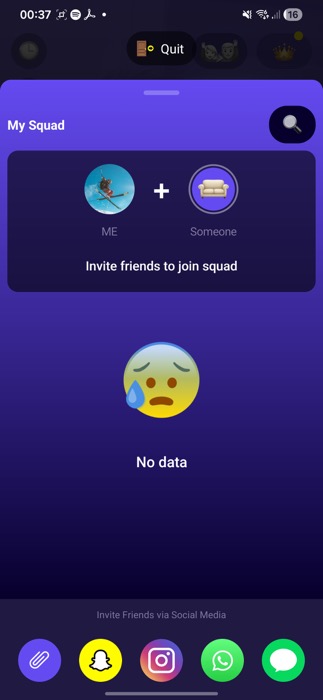
My Squad — squad-mode social layer; "ME + Someone" invite prompt; empty state with direct invite CTA via Snapchat, Instagram, WhatsApp, iMessage
Insight
Routes all post-match text to a dedicated Messages inbox, making chat a social layer rather than a session tool.
Monkey
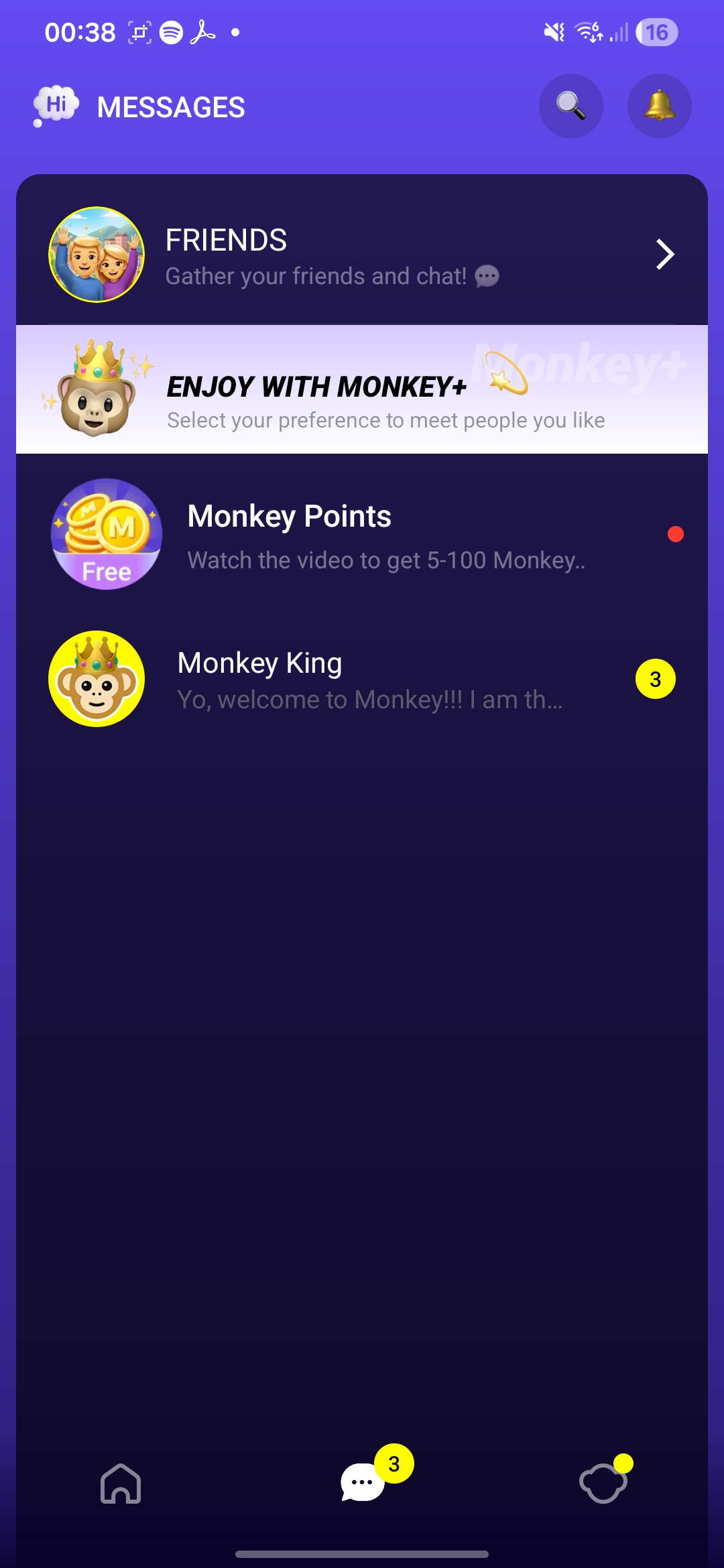
Messages inbox — Friends, Monkey+ promotion, Monkey Points (free rewards), Monkey King onboarding bot; all post-match communication surfaces in one list
Insight
The Monkey King bot stands out as a pattern worth borrowing — embedding rules and onboarding directly in a conversational UI makes moderation feel human rather than bureaucratic.
Conclusion
The absence of in-session text chat is a significant gap — Azar removes it entirely (emoji and gifts only), and Monkey moves it to a post-match layer. The effect is measurable: users who are camera-shy, in a noisy environment, or in a language mismatch have no fallback. Monkey's Monkey King onboarding bot is the strongest pattern in this category — embedding rules and guidance in a conversational UI makes moderation feel human rather than bureaucratic, a meaningful trust signal especially for new users.
No product currently offers seamless in-session text-and-video without a mode switch — this is the clearest white space in the entire category.
If reducing drop-off from camera-shy or noisy users is a priority → add a lightweight overlay text input on the video feed. It should not require switching modes or leaving the session.
If post-match retention is the goal → adopt Monkey's dedicated Messages inbox model: route all post-match communication to a single social layer with bot-driven onboarding built in.
If trust and safety are a differentiator → borrow the Monkey King pattern — a conversational bot that delivers community guidelines, rewards, and moderation nudges feels human and reduces the perception of heavy-handed enforcement.
Research Findings
At-a-Glance Comparison
The table below summarizes key product dimensions across all four platforms as a quick reference frame for the deep dives that follow.
Dimension
Chatroulette
Azar
OmeTV
Monkey
User scale (MAU)
~2M monthly visits
~8M monthly visits
100M+ installs / 15M+ MAU
~50M+ installs
Match availability
Session-only (manual start)
Session-only (manual start)
Session-only (manual start)
Session-only (manual start)
Pre-match filters
Country (free), Gender (premium?)
Country + Gender (premium)
Gender + Country + Interests
Gender preference (free)
Filter placement
Before/during search
Before/during search
Profile-set + per-swipe
Before search only
Shows available users
No
No
No
No
Avg. wait between matches
~2–5 sec (large pool)
~3–8 sec
~5–15 sec (filtered)
~2–5 sec
Registration required
No (social login optional)
Yes (Facebook/VK/email)
Yes (social/phone)
Yes (social/email)
Primary nav paradigm
Single-screen, skip
Single-screen, skip
Swipe-left card
15-sec intro clip → extend
Ban trigger threshold
3 reports in ~5 min
Multiple reports, automated
AI + human moderation
Reports + AI
Ban duration
24–72h to permanent
Hours to weeks
Temporary escalating
Temporary
Unique safety feature
Top Users ranking
24/7 human moderators + native AR face filters for in-call anonymity
All four products share a core tension: the faster the match, the less control the user has over who they meet — and vice versa. No platform uses ambient or background matching; presence is intentional and consensual.
See table below.
Dimension
Chatroulette
Azar
OmeTV
Monkey
1.1 Pre-match filters
Country filter free; gender unclear/limited. No interest tags. Filtering is lightweight by design — identity is post-match.
Country + Gender filters. Gender/region require premium (paid or VK/Facebook login). Filters apply before queueing, not after.
Richest filter set: gender, country, interest hashtags, Super Match (deep preference engine). Preferences also set in profile.
Gender preference only (free). Intentionally minimal — speed is the core UX value proposition.
1.2 Filter placement in the flow
Filter panel before session but not surfaced prominently. Feels like an afterthought to the core 'just connect' CTA.
Same as Chatroulette — before session, not prominent; afterthought to Start.
Filters in profile (persistent) AND per-swipe (transient). Persistent intent plus in-session overrides.
Single onboarding choice that persists silently. No mid-session override.
1.3 When is the user available for a match?
Match queue starts on page load / tapping Start. No passive queuing.
Match begins when user taps Start. No push-based passive connection.
Swipe-left initiates match request. Users only in pool when session is active.
Tapping camera icon starts matching. 15-second intro clip plays immediately — no 'preview' state.
1.4 Active users & wait times
~2M monthly website visits. Large global pool on web. Match wait: 2–5 sec at peak. Thins considerably for filtered searches.
~8M monthly visits — largest pool of the four. Match wait: ~3–8 sec unfiltered. Gender/country filters: 10–30 sec by region.
100M+ installs; ~15M+ MAU. Filtered matches: ~5–15 sec standard, up to 60s+ with narrow filters.
50M+ installs; strong Gen Z. Match wait: ~2–5 sec. Very low filter complexity keeps pool undivided.
Full-screen stranger (dominant). Self PiP corner. Text chat sidebar. Next / Report / Text input. Near-zero chrome. Light/Dark toggle.
Full-screen stranger. Self PiP bottom corner. Text input bar bottom. Report Next overlaid. Mobile vertical, full-screen. Native AR face filters accessible mid-call
Split: stranger large, self PiP. AR filter panel; translation overlay below video. Gift/reaction toolbar. More chrome.
Full-screen vertical mobile-native. Self small bottom-left. Emoji strip. Extend/Skip prominent. 15-sec timer. No text chat; social-media-native.
Layout principles
Stranger-dominant; controls on periphery; text sidebar as escape valve.
Same. Text sidebar.
Stranger-dominant; AR/filter mid-conversation reduces camera anxiety.
Stranger-dominant; no text — spoken/visual only.
Orientation & platform fit
Landscape-first (web). Mobile adapts. Webcam culture, desktop origins.
Dual: landscape web, portrait mobile. Mobile portrait dominant.
Portrait-first mobile-native. Swipe left = dating app muscle memory. Vertical native.
Portrait only; mobile-native. Vertical = TikTok/Reels/Snapchat Gen Z.
The 15-second intro clip before extending a session reduces low-quality connections and adds a shared countdown as a micro-experience. Users commit progressively rather than all at once.
Time-gated first contact as a structural mechanic, not a moderation patch.
Monkey
In-Session Safety Without Leaving the Flow
Embed safety controls directly in the session — no separate screens, no flow interruption. Take it further with native AR face filters: letting users mask their appearance mid-call is the most effective privacy tool in the category, and no competitor offers it without third-party tools.
Built-in face-masking allowing privacy by default, not a cosmetic extra.
Azar
Persistent On-Screen Safety Disclaimer
A visible moderation reminder stays on screen throughout the session without blocking interaction. Sets behavioural expectations passively.
Ambient rules reminder at the edge of the video frame — low friction, high signal.
OmeTV
Bot-Driven Community Onboarding
Rules and community guidelines delivered via a conversational bot in the inbox rather than a static modal. Moderation feels human and the format matches the product's social context.
Bot-driven onboarding as a safer, more engaging alternative to terms-of-service screens.
Monkey
Opt-In Filters, Not Mandatory Gates
Filters are available but never block the default "Start" path. New users get instant access; returning users layer on control over time.
Progressive filter disclosure — surface them after first session, not before first match.
Chatroulette
✗ Avoid
Filter Friction at Entry
Azar's richest filter set is exposed upfront, adding decision load before users have experienced a single match. New users are most likely to abandon at this point.
Gating the first session behind preference configuration — it optimises for control over acquisition.
Azar
Safety Rules Visible But Not Enforced Early
Rules appear early in the flow but don't create a commitment moment. Users can proceed without acknowledging them, weakening their behavioural effect.
Passive rules display without a micro-commitment (tap, checkbox, or conversational acknowledgement).
Chatroulette
No Seamless In-Session Text + Video
Every product treats text and video as separate modes. Switching from video to text breaks the conversation flow and is rarely used as a result.
Forcing a mode switch to send a message — overlay text input on the video feed instead.
All
Reactive-Only Moderation
Products that rely solely on user reports create a lag between bad behaviour and consequence. The fastest-feeling products (Azar, Monkey) designed safety into the architecture instead.
Treating moderation as a post-hoc layer. Build behavioural constraints into the session structure from day one.
ChatrouletteOmeTV
No Post-Session Social Layer
Once a session ends there is no mechanism to reconnect, follow, or surface the person again. Every match is disposable, reducing long-term retention and social graph formation.
Designing for pure disposability — even a lightweight "add" or "favourite" mechanic meaningfully improves return rate.
OmeTVChatroulette
Key Takeaways
Consolidated findings and recommendations from in-product screenshot analysis across Chatroulette, OmeTV, Azar, and Monkey. Core principle: speed and safety are not opposites — structural design delivers both.
Speed to First Match
Users expect to be in a session within 10 seconds of opening the app. Every extra step — registration, permission prompts, filter configuration — measurably increases drop-off before a single match is made.
Zero mandatory steps before first match. Permissions and preferences follow, never precede.
Skip is the Primary Verb
Across all four products, Skip/Next is the most-used control by an order of magnitude. It must have zero latency, be permanently visible, and carry no friction. Any delay or cooldown is felt immediately as product quality.
Treat skip performance as a core infrastructure metric, not a UI detail.
Safety Must Be Structural, Not Reactive
The highest-retention products (Azar, Monkey) built safety into the session architecture — time limits, one-time onboarding consent, in-session toggles — rather than relying on user reports after harm occurs.
Design safety constraints into the flow from day one. Reactive moderation alone is insufficient.
Filters Serve Retention, Not Onboarding
New users need speed, not control. Filter complexity at entry increases abandonment. Returning users seek control — progressive filter unlocking (basic free, advanced premium) satisfies both without compromising acquisition.
Gate advanced filters behind the first completed session, not the first screen.
Mobile-First is Non-Negotiable
80%+ of sessions are on mobile. Vertical video, thumb-zone controls, and minimal text input are baseline requirements — not enhancements. Products that required desktop-style interactions showed lower engagement.
Design exclusively for portrait mobile. Desktop is a stretched version, not the primary canvas.
No Product Has Solved In-Session Text + Video
Every product forces a mode switch to send a message mid-call. This friction means text chat is rarely used as a session tool — it becomes a post-match social layer at best. There is a clear white space for seamless in-session hybrid interaction.
Overlay text input on the video feed without breaking the session loop.
Navigation Depth Tracks Audience Age
Monkey's one-tap loop and Azar's multi-mode hub represent opposite ends of the same trade-off — not quality differences. The right depth is a product positioning decision, not a feature checklist. Misaligning nav complexity with target demo increases churn.
For 18–25: minimise to a single loop. For 25–35: surface optional depth after the core loop is established.
No Product Has a Post-Session Social Layer
Once a session ends, all four products offer no meaningful mechanism to reconnect, follow, or resurface a person. Every match is disposable. This is a structural retention gap — a lightweight "add" or "favourite" mechanic would directly improve return rate.
Build a minimal post-session action (add / save / follow) before launch, not as a v2 feature.
Build a Commitment-Escalation Match Loop
Rather than an open-ended session, structure the first contact as a short timed clip (15–30s) with an explicit extend action. This creates a shared micro-experience, reduces low-quality connections, and gives both users agency at the moment of highest intent.
Time-gate the first session. Make extension a mutual or one-sided choice.
Replace Rules Modals with Conversational Onboarding
Static terms-of-service screens are ignored. A bot-driven onboarding conversation (as Monkey's King bot demonstrates) delivers community guidelines in a format native to the product, creates a genuine acknowledgement moment, and sets behavioural expectations without friction.
Use a conversational bot for first-launch rules. Never use a static modal again.
Random video chat category market leaders UX analysis